深圳小程序制作公司提醒大家媒體組件有audio音頻組件、image圖片組件、video視頻組件,audio音頻組件用來播放音樂,image圖片組件用來顯示圖片,video視頻組件用來播放視頻。
audio音頻
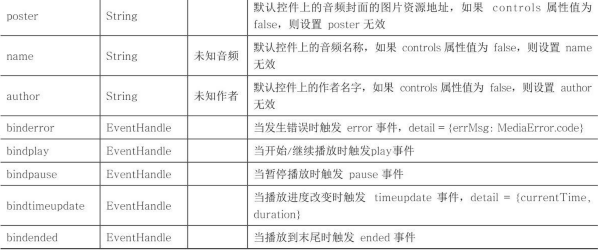
audio音頻組件需要有唯一的id,根據(jù)id使用wx.createAudioContext('myAudio')創(chuàng)建音頻播放的環(huán)境,src屬性是音頻播放的資源路徑,poster屬性是音頻的播放圖片,name屬性為音頻名稱,綁定播放、暫停等事件,具體屬性如表1.1所示。
表1.1audio音頻屬性
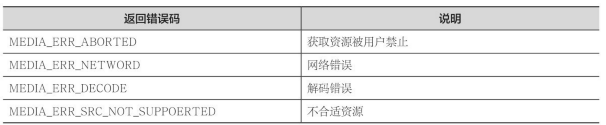
MediaError.code錯誤碼如表1.2所示。
表1.2返回錯誤碼
示例代碼如下所示:
<!--audio.wxml--><audioposter="{{poster}}"name="{{name}}"author="{{author}}"src="{{src}}"id="myAudio"controlsloop></audio><buttontype="primary"bindtap="audioPlay">播放</button><buttontype="primary"bindtap="audioPause">暫停</button><buttontype="primary"bindtap="audio14">設(shè)置當前播放時間為14秒</button><buttontype="primary"bindtap="audioStart">回到開頭</button>
代碼說明如圖1.3所示。
圖1.3audio.wxml代碼說明
//audio.jsPage({onReady:function(e){//使用wx.createAudioContext獲取audio上下文contextthis.audioCtx=wx.createAudioContext('myAudio')},data:{poster:'http://y.gtimg.cn/music/photo_new/T002R300x300M000003rsKF44GyaSk.jpg?max_age=2592000',name:'此時此刻',author:'許巍',src:'http://ws.stream.qqmusic.qq.com/M500001VfvsJ21xFqb.mp3?guid=ffffffff82def4af4b12b3cd9337d5e7&uin=346897220&vkey=6292F51E1E384E06DCBDC9AB7C49FD713D632D313AC4858BACB8DDD29067D3C601481D36E62053BF8DFEAF74C0A5CCFADD6471160CAF3E6A&fromtag=46',},audioPlay:function(){this.audioCtx.play()},audioPause:function(){this.audioCtx.pause()},audio14:function(){this.audioCtx.seek(14)},audioStart:function(){this.audioCtx.seek(0)}})
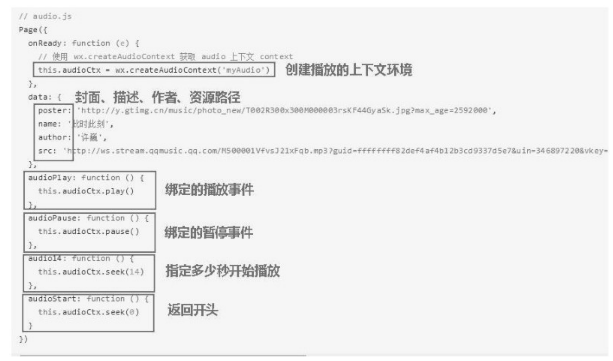
代碼說明如圖1.4所示。
圖1.4audio.js代碼說明
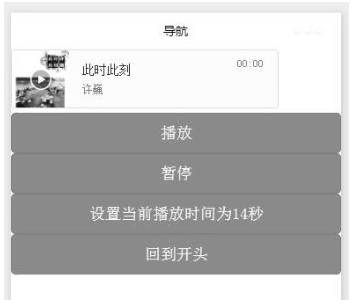
界面效果如圖1.5所示。
圖1.5音頻播放界面效果
小程序制作公司本文關(guān)于“小程序制中媒體組件的音頻組件是怎樣制作的?”的知識就介紹分享到這里,謝謝關(guān)注,博納網(wǎng)絡(luò)編輯整理。